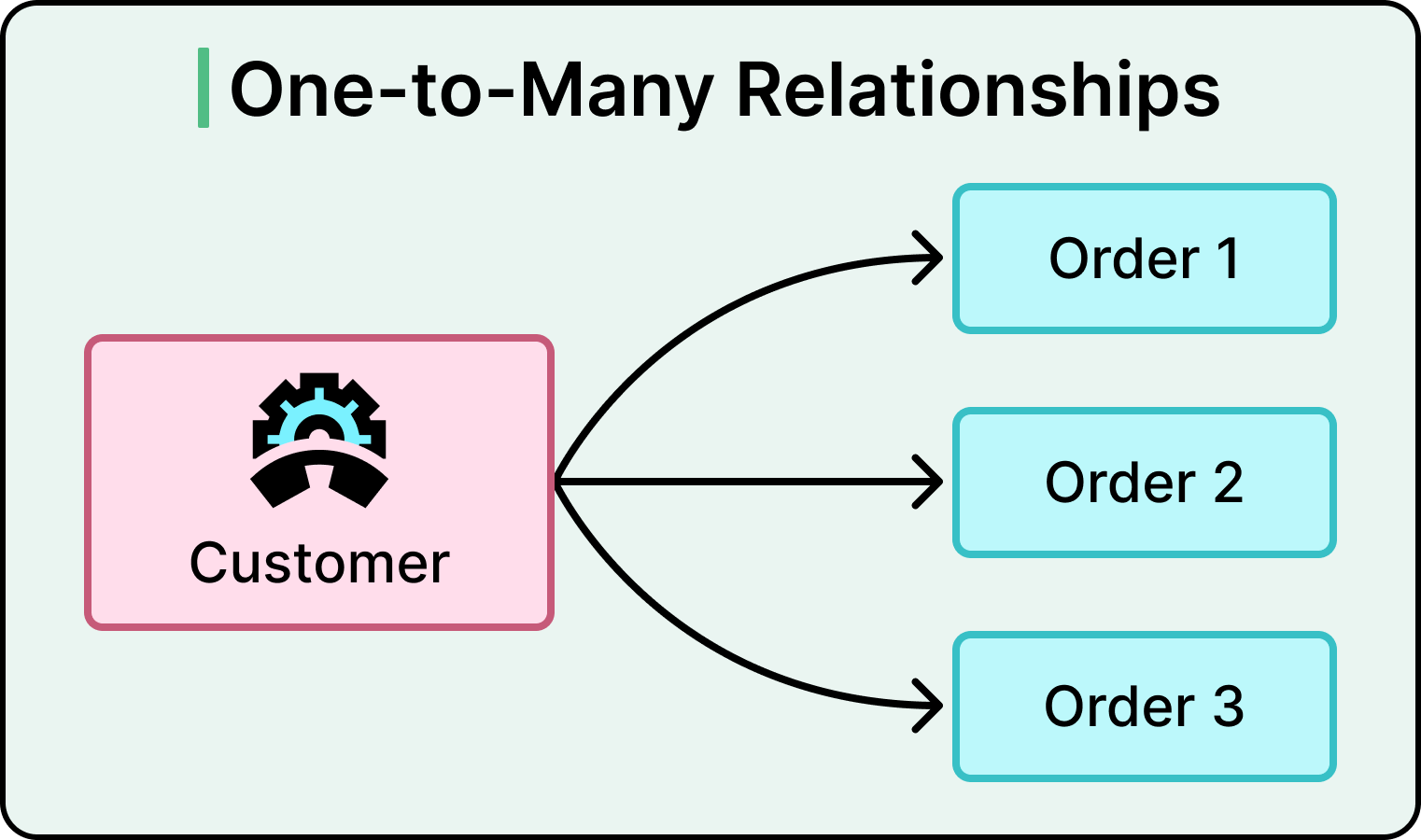
Understand database relationships in Python. Learn primary keys, foreign keys, SQL joins and how to design relational databases for applications — explained simply, with real examples
Introduction
Imagine developing a college management system.
A student can register for several courses. Each course can have many students. Every course may also have an assigned trainer, while a student can make several payments.
How do you organize this information without duplicating records unnecessarily?
The answer is database relationships.
Database relationships are fundamental to backend development because they define how different records connect within a database. Python developers working with Django, FastAPI, MySQL, and PostgreSQL need to understand these concepts — and the good news is that, once you see a few real examples, they’re far more intuitive than they first sound.
Why This Topic Feels Confusing at First (and Why It Shouldn’t)
A lot of beginners hear terms like “foreign key” or “many-to-many relationship” and assume this is advanced, abstract computer science theory. It isn’t. These concepts describe something you already understand from everyday life — how a student is connected to the courses they’ve taken, or how a customer is connected to the orders they’ve placed. The “hard part” is just learning the vocabulary and syntax used to describe these everyday connections inside a database. Once that clicks, the underlying idea is genuinely simple.
What Are Database Relationships?
Database relationships describe how records in different tables are connected.
For example, a college database may contain:
- Students
- Courses
- Trainers
- Enrolments
- Payments
Instead of storing every piece of information in one large table, the information is separated into related tables. This makes data easier to manage and reduces unnecessary duplication.
A Simple Way to Picture This
Think of a database like a set of separate notebooks instead of one giant notebook. One notebook lists all students. Another lists all courses. A third notebook — the “enrolments” notebook — simply notes which student is taking which course. This way, you never have to rewrite a student’s full details every single time they enrol in a new course; you just add one line connecting their ID to a course ID. That’s really all a database relationship is doing.
Understanding Primary Keys and Foreign Keys
Primary Key
A primary key uniquely identifies each record in a database table. For example, every student may have a unique student_id — think of it like a national ID number, but for a row in a database table. No two students share the same one.
Foreign Key
A foreign key is a field that references a key in another table. For example, an enrolment record can contain a student_id that references the corresponding student — it’s simply pointing to “this specific student” without repeating all of that student’s information again.
1. One-to-One Relationship
A one-to-one relationship means one record in a table is associated with one record in another table.
Example: One student has one student profile.
CREATE TABLE students ( id INT PRIMARY KEY AUTO_INCREMENT, full_name VARCHAR(150) ); CREATE TABLE student_profiles ( id INT PRIMARY KEY AUTO_INCREMENT, student_id INT UNIQUE, address VARCHAR(255), FOREIGN KEY (student_id) REFERENCES students(id));
The UNIQUE constraint ensures that a student can have no more than one associated profile record. In plain terms: this is like saying “every person has exactly one passport” — not zero, not two.
2. One-to-Many Relationship
A one-to-many relationship means one record can be associated with multiple records in another table.
Example: One trainer can teach several courses.
CREATE TABLE trainers ( id INT PRIMARY KEY AUTO_INCREMENT, name VARCHAR(150) ); CREATE TABLE courses ( id INT PRIMARY KEY AUTO_INCREMENT, course_name VARCHAR(150), trainer_id INT, FOREIGN KEY (trainer_id) REFERENCES trainers(id));
One trainer can appear in multiple course records. Think of it like one teacher at a school being listed as the instructor for several different classes — the teacher doesn’t change, but they’re connected to many classes at once.
3. Many-to-Many Relationship
A many-to-many relationship means multiple records in one table can be associated with multiple records in another table.
Example: A student can enrol in several courses, and each course can have many students.
This requires an intermediary table — sometimes called a “junction” or “bridge” table, because its whole job is to sit between the two tables and record which combinations exist.
CREATE TABLE students ( id INT PRIMARY KEY AUTO_INCREMENT, full_name VARCHAR(150) ); CREATE TABLE courses ( id INT PRIMARY KEY AUTO_INCREMENT, course_name VARCHAR(150) ); CREATE TABLE enrolments ( student_id INT, course_id INT, enrolment_date DATE, PRIMARY KEY (student_id, course_id), FOREIGN KEY (student_id) REFERENCES students(id), FOREIGN KEY (course_id) REFERENCES courses(id));
The enrolments table connects students and courses. Picture a school’s enrolment register — one long list where each line just says “this student, this course, this date.” That’s the entire function of a junction table.
Understanding SQL JOINs
SQL JOINs allow developers to retrieve information from related tables — essentially asking the database to “stitch together” rows from two or more tables based on their connection.
For example:
SELECT
    students.full_name,
    courses.course_name
FROM enrolments
JOIN students
    ON enrolments.student_id = students.id
JOIN courses
    ON enrolments.course_id = courses.id;
This query retrieves students together with the courses they have enrolled in. In plain language: “Go to the enrolments list, and for every entry, fetch the matching student’s name and the matching course’s name.” JOINs can look intimidating the first few times you write one, but they always follow this same basic pattern — match rows based on a shared key, then pull the fields you actually need.
Database Relationships in Django ORM
Django provides relationship fields so you rarely need to write raw SQL for common relationships:
OneToOneFieldForeignKeyManyToManyField
Example:
from django.db import models

class Trainer(models.Model):
    name = models.CharField(max_length=150)

class Course(models.Model):
    name = models.CharField(max_length=150)
    trainer = models.ForeignKey(
        Trainer,
        on_delete=models.PROTECT,
        related_name="courses"
    )
This defines a one-to-many relationship between trainers and courses. One of the best things about Django’s ORM is that it lets you describe these relationships in plain Python, and it generates the correct SQL structure behind the scenes — which is genuinely one of the more beginner-friendly ways to start working with relational databases.
Database Relationships in SQLAlchemy
SQLAlchemy also supports relational mappings through foreign keys and relationship declarations.
Example:
from sqlalchemy import ForeignKey
from sqlalchemy.orm import Mapped, mapped_column
from sqlalchemy.orm import relationship

class Course(Base):
    __tablename__ = "courses"

    id: Mapped[int] = mapped_column(primary_key=True)
    name: Mapped[str]

    trainer_id: Mapped[int] = mapped_column(
        ForeignKey("trainers.id")
    )

    trainer: Mapped["Trainer"] = relationship(
        back_populates="courses"
    )
A corresponding relationship must also be defined on the Trainer model. SQLAlchemy gives you more explicit control than Django’s ORM, which makes it a natural next step once you’re comfortable with the basic relationship concepts above.
Practical Database Projects
Project 1: College Management System
Connect students, trainers, courses, and enrolments.
Project 2: E-commerce System
Connect customers, products, orders, and order items.
Project 3: POS System
Connect products, categories, sales, customers, and users.
Project 4: Hospital Management System
Connect patients, doctors, appointments, and medical records.
Project 5: Learning Management System
Connect students, lessons, courses, assessments, and results.
Working through even one of these projects hands-on will teach you more about relationships than reading explanations alone — this is a topic that really clicks once you’ve designed your own tables and hit (and fixed) your own mistakes.
Common Beginner Mistakes With Database Relationships
- Storing the same information (like a student’s full name) repeatedly in multiple tables instead of referencing it through a foreign key — this leads to inconsistent data if it’s ever updated in only one place.
- Forgetting to add a junction table for many-to-many relationships, and instead trying to force the connection into one of the two main tables.
- Not deciding what should happen when a referenced record is deleted — for example, what happens to a course’s enrolment records if the course itself is deleted.
- Skipping SQL fundamentals entirely and relying only on an ORM, which makes it harder to understand or fix problems when the ORM’s generated query doesn’t behave as expected.
Recognizing these patterns early — ideally with an instructor pointing them out as you go — saves a lot of frustration later, especially once a project grows beyond a simple practice exercise.
Why Database Design Matters
Good database design helps developers:
- Reduce data duplication
- Maintain data consistency
- Improve query organization
- Enforce data integrity
- Build maintainable applications
- Support more complex business processes
Learn Database Design at DAZU Training Institute
DAZU Training Institute encourages practical programming and software development — and database design is taught the way it’s actually used in real projects, not as an abstract theory lesson.
Understanding database relationships helps students develop applications that manage real business information. For example, when developing a POS system, you need to understand how products relate to categories, how sales relate to customers, and how individual sale items relate to products.
If terms like “foreign key” or “many-to-many” still feel a little confusing after reading this, that’s completely normal — this is exactly the kind of topic that’s much easier to learn with an instructor explaining it alongside real, hands-on examples, rather than from text alone. At DAZU, beginners are walked through these concepts step by step, starting with simple examples like the student-and-course relationship above, before moving on to full, real-world systems like POS, hospital, or e-commerce platforms. You’re never expected to just “figure it out” from a textbook — questions are welcome, and the pace is built around actually understanding the concept, not just memorizing syntax.
Explore courses: https://dazu.ac.ke/courses
Contact: +254 722 922 454
Frequently Asked Questions
1. What is the difference between a primary key and a foreign key?
A primary key uniquely identifies a record, while a foreign key references a key in another table.
2. What is a one-to-many relationship?
It is a relationship where one record can be associated with multiple records in another table.
3. Why is a junction table needed in many-to-many relationships?
It stores the connections between records in two tables and can also contain additional information about each relationship, such as an enrolment date.
4. Can Django manage database relationships?
Yes. Django provides relationship fields such as ForeignKey, OneToOneField, and ManyToManyField.
5. Do I need to understand SQL if I use an ORM?
Yes. Understanding SQL helps you design better databases and troubleshoot queries generated by an ORM — and it’s genuinely not as intimidating as it looks once you’ve written a few queries by hand.
6. Do I need to be good at math to understand database relationships?
No. This topic is more about logical organization — thinking clearly about how real-world things (students, courses, orders) relate to each other — than it is about mathematics.
Conclusion
Database relationships are a foundation of professional backend development.
Whether you are building a student management system, POS application, hospital platform, or e-commerce website, understanding how tables connect is essential — and far more approachable than it first appears once you’ve seen it explained with real, relatable examples.
Learn to design and build structured database-driven applications with DAZU Training Institute — beginner-friendly, hands-on, and built around real projects.
Visit: https://dazu.ac.ke/courses
Contact: +254 722 922 454
Related articles
 programming/ coding FastAPI Python Framework: Learn to Build Modern and High-Performance REST APIs
 programming/ coding SQLAlchemy and Django ORM: Learn Python Database Management Without Writing Every SQL Query
 programming/ coding Authentication and Authorization in Python: Secure User Access in Backend Applications
 programming/ coding JWT and OAuth2 in Python: Learn Modern API Authentication and Token Security
 programming/ coding Python API Security: How to Protect Backend Applications from Cyber Threats
 programming/ coding Python Application Deployment: Learn How to Launch Django and FastAPI Projects Online
 programming/ coding Python Programming Course in Kenya: Learn Functions, Data Structures and Practical Problem-Solving
 programming/ coding Python Programming Course in Kenya: Build Real-World Projects with APIs, Databases and Automation
You might also like
 security What is Cybersecurity? A Complete Guide for Beginners
Nov 16, 2026
 software development Software Engineering Course in Thika: Build Real Skills, Real Projects, Real Career Opportunities
Nov 13, 2026
 beauty el Nails, Acrylic Nails and Nail Art: Which Skills Should You Learn?
Nov 13, 2026
 beauty Beauty Skills You Can Learn and Turn Into a Profitable Business in Kenya
Nov 13, 2026
 beauty Manicure and Pedicure Course in Kenya: Everything You Need to Know
Nov 13, 2026
 beauty : How to Become a Professional Nail Technician in Kenya
Nov 13, 2026